Kubernetes (k8s)
Contents
- Overview
- Architecture
- Workloads, Pods and Services
- Minikube, kubectl
- Configs and secrets
- Development
- k8s on GKE
- References
Overview
- Kubernetes (k8s) is a container orchestration engine. It’s a portable and extensible tool that can run anywhere (different clouds + on-prem).
- It’s a tool open-sourced by Google, which is a different/better version of borg – Google’s internal version of k8s.
- k8s is better than typical VM/container-based deployments for a bunch of reasons: self-healing containers, automated rollouts/rollbacks, secret and configuration management, service discovery, extensibility.
- Everything (create/update/deleting resources) is k8s managed by a bunch of configuration (YAML) files.
- All public cloud providers offer managed Kubernetes as a solution these days.
Architecture
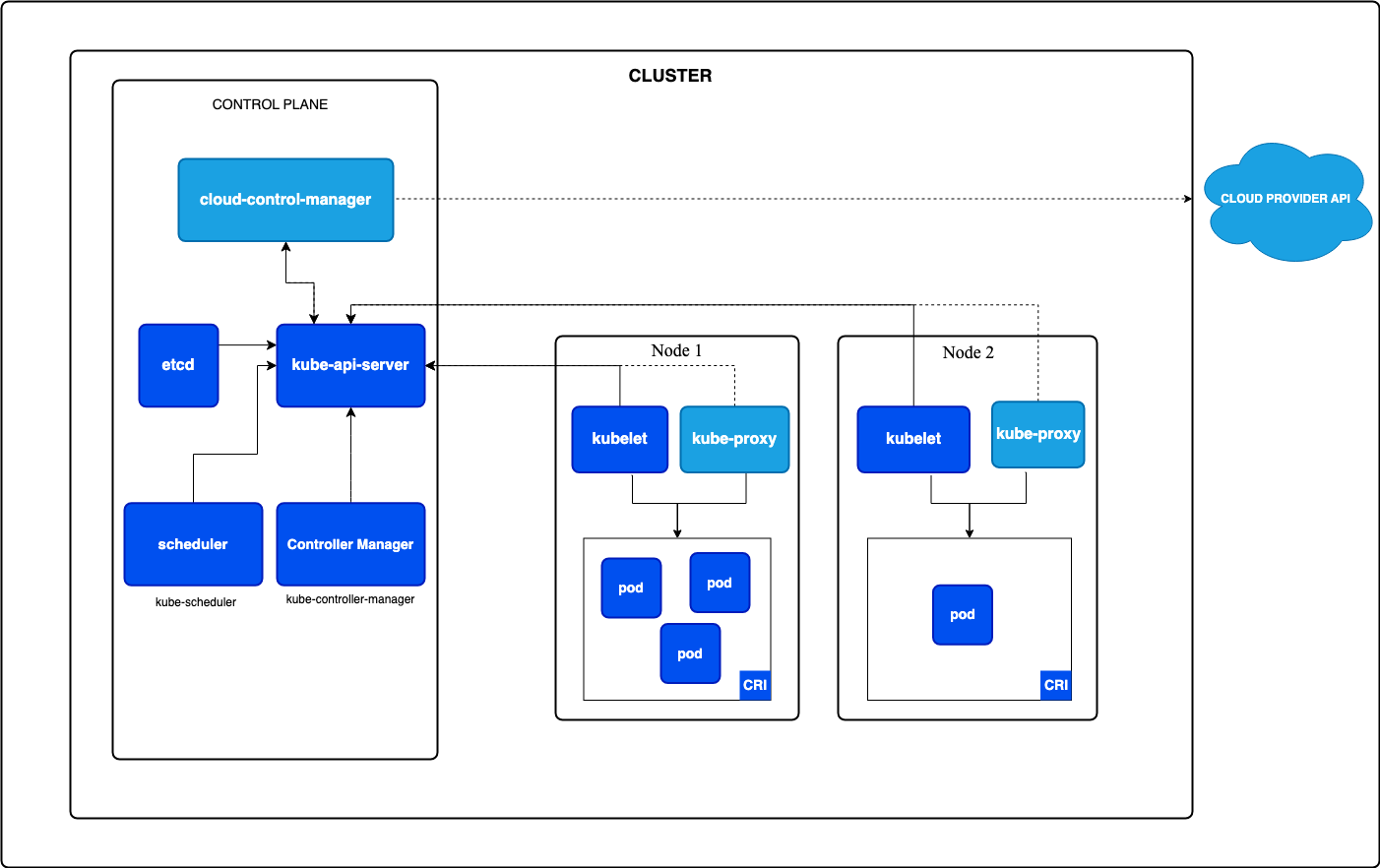
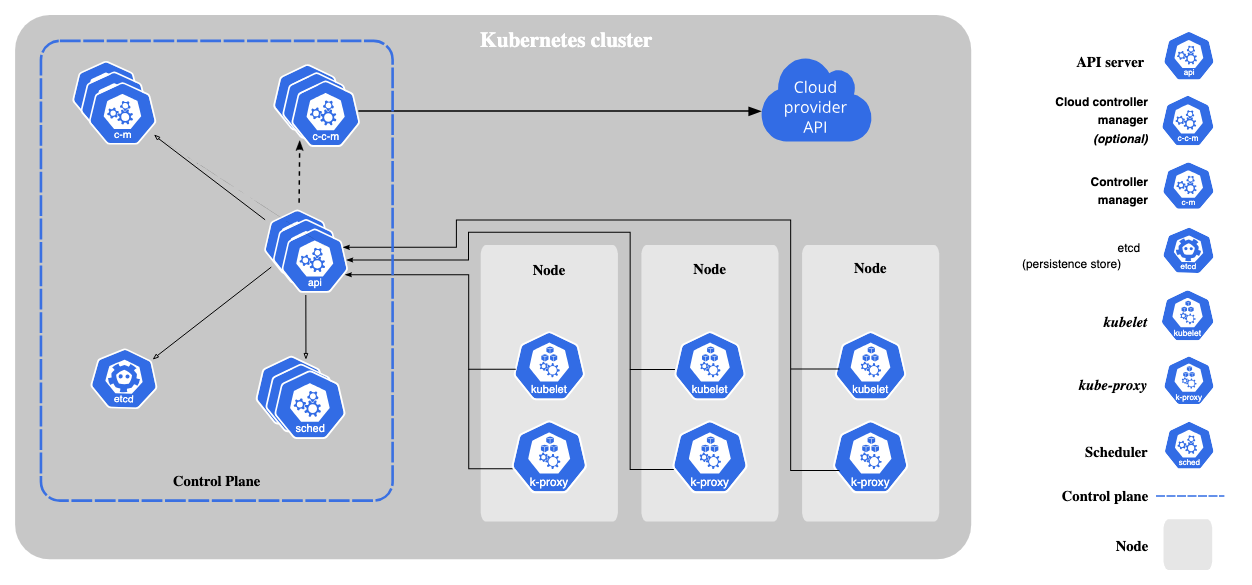
- The cluster is where all the orchestration happens.
- Control plane is what manages the orchestration.
- Node is where the workloads run – it’s a physical/virtual machine.
- Pods (aka workload) is the actual application running as a docker container using some container runtime.
- Detailed breakdown of components
Workloads
- Workload is basically an application running on k8s. We run them as pods.
- Workloads can be anything from Deployment (a stateless app), StatefulSet (a stateful app), Job, or a Cron Job.
- YWeou can autoscale (both horizontally and vertically) these workloads (within a node?) depending on the traffic or resource usage.
- For horizontal autoscaling, we can use HorizontalPodAutoscaler (HPA).
- Detailed breakdown of workloads
Pods
- Pods are the smallest deployable units of computing which run a workload.
- Pod is a single container; It is a set of Linux namespaces, cgroups.
- Pod has a lifecycle.
- Pod usually runs along with some other special containers like init containers and sidecar containers to extend functionality (logs, metrics, proxy, etc.).
- Nice demo on sidecar magic.
Services
- Service is how we expose a pod/workload.
- An Ingress is another type of service that exposes HTTP and HTTPS routes from outside the cluster to services within the cluster.
- Ingress can help with route/resource management with basic URL-based rules.
Minikube, kubectl
Tools to develop k8s locally
- We can use minikube to play with k8s clusters locally on a personal machine (more below).
- We’ll need kubectl short for Kubernetes control to manage things inside the cluster (more below).
Minikube
- Minikube is the tool to set up a local Kubernetes cluster.
- Install Minikube using homebrew (if using macOS) or in other ways.
- Basic controls:
minikube start --driver=dockerto start the clusterminikube statusto check cluster statusminikube dashboardto access the k8s cluster dashboardminikube service SERVICE --url -n NAMESPACEto get a URL for the serviceminikube tunnelto expose the network
kubectl
- kubectl is the command line tool to interact with the Kubernetes cluster’s control plane.
- Basic controls:
kubectl create -f CONFIG.ymlto create a workload/service, etc.kubectl apply -f CONFIG.ymlto apply changes to workload/service, etc.kubectl delete -f CONFIG.ymlto delete a workload/service, etc.kubectl get podsto get podskubectl get servicesto get serviceskubectl get nodesto get nodeskubectl logs POD_NAMEto get logs of a pod
Configs and secrets
ConfigMap
- ConfigMap is used to store non-confidential data in key-value pairs.
- ConfigMap does not provide secrecy or encryption.
- Pods can use ConfigMap and access the data inside.
- We can create both immutable and mutable ConfigMap’s.
- More on ConfigMap’s here.
Secrets
- Secrets are like ConfigMap but they provide secrecy or encryption. This is where we can store all the secret information that the app needs.
- Pods can use secrets to access the data inside.
- More on secrets here.
Development
Breakdown of configuration files
- We can either create a configuration for each resource of combine them in a single file
- Best pratices
Create a deployment
- Create a deployment for app with image, secrets, configs and autoscaler
- Prerequisites
- Create secrets
kubectl create secret generic app-secrets --from-env-file=.secrets - Create ConfigMap
kubectl create configmap generic app-secrets --from-env-file=.configs
- Create secrets
- Configuration file
apiVersion: apps/v1 kind: Deployment metadata: name: app spec: replicas: 1 strategy: type: RollingUpdate rollingUpdate: maxSurge: 1 maxUnavailable: 1 selector: matchLabels: app: app template: metadata: labels: app: app spec: containers: - name: app image: app:latest imagePullPolicy: Always ports: - containerPort: 3000 readinessProbe: httpGet: path: / port: 3000 initialDelaySeconds: 5 periodSeconds: 10 envFrom: - secretRef: name: app-secrets - configMapRef: name: app-configs resources: requests: cpu: "500m" limits: cpu: "1000m" restartPolicy: Always - Run
kubectl create -f deployment.ymlto create a deployment
Create a service
- Create a service to expose the deployment pods
- Configuration file
apiVersion: v1 kind: Service metadata: name: lb spec: type: LoadBalancer ports: - port: 80 targetPort: 3000 protocol: TCP selector: app: app - Run
kubectl create -f service.ymlto create a service
Create a autoscaler
- Create the autoscaler for pods
- Configuration file
apiVersion: autoscaling/v1 kind: HorizontalPodAutoscaler metadata: name: r8s-hpa spec: scaleTargetRef: apiVersion: apps/v1 kind: Deployment name: app minReplicas: 1 maxReplicas: 3 targetCPUUtilizationPercentage: 80 - Run
kubectl create -f autoscaler.ymlto create an autoscaler
k8s on GKE
-
Using terraform to create k8s clusters on GKE (thanks!)
data "google_container_engine_versions" "gke_version" {
  location = var.region
  project = var.project
  version_prefix = "1.27."
}

resource "google_container_cluster" "primary" {
  name     = "${var.app}-gke"
  location = var.region
  project  = var.project

  remove_default_node_pool = true
  initial_node_count       = 1

  network    = var.network
  subnetwork = var.subnetwork
}

resource "google_container_node_pool" "primary_nodes" {
  name       = google_container_cluster.primary.name
  location   = var.region
  project    = var.project
  cluster    = google_container_cluster.primary.name

  version = data.google_container_engine_versions.gke_version.release_channel_latest_version["STABLE"]
  node_count = var.nodes

  node_config {
      oauth_scopes = [
          "https://www.googleapis.com/auth/logging.write",
          "https://www.googleapis.com/auth/monitoring",
          "https://www.googleapis.com/auth/devstorage.read_only"
      ]

      machine_type = "n1-standard-1"
      tags         = ["${var.app}-gke-node"]
      metadata = {
          disable-legacy-endpoints = "true"
      }
  }
}
gcloud components install kubectlto access GKE clusters (more things to setup)kubectl config get-contextsto get contexts from GKEkubectl config set-contextto set the context